
AI Provider Service
What this service is for
Section titled “What this service is for”The AI Provider Service (zship-provider1-service) exists to solve two problems:
- Integration: Beyond core
node10-ai, it unifies external image / video / TTS APIs (KIE, WaveSpeed, …) behind one gateway — same auth, credits, and task model — so your product code does not sprawl with multiple SDKs and signing styles. - Operations: Async generation (callbacks, retries, refunds) is hard to run without admin tools. Testing, task logs, analytics, gallery, rate limits, and blocks are there so you can validate config, answer support, read usage, and enforce policy without shipping app releases for every change.
Supported providers
Section titled “Supported providers”| Provider | API | Typical capabilities |
|---|---|---|
| KIE | api.kie.ai | Image (nano-banana-2, Seedream), video (Kling, Wan), TTS (ElevenLabs), and more |
| WaveSpeed AI | api.wavespeed.ai | Image (nano-banana-2), video (Wan 2.6), editing, LoRA, and more |
Why: One place to manage multiple vendors — swap models or vendors mostly by configuration, not by branching product code.
Core gateway capabilities
Section titled “Core gateway capabilities”| Capability | Why we built it |
|---|---|
| No-code onboarding | Add models, change mapping or validation without a new web/admin release — shorter iteration and safer rollbacks when a model is misbehaving. |
| Credits | Tied to node1-auth so every task has traceable spend — easier refunds, reconciliation, and disputes. |
| Webhooks & R2 | Most providers are async; standard callbacks and file offload let dashboards and lists show stable results instead of every client inventing URLs. |
| Config-driven mapping | Absorb vendor-specific JSON (mapping, templates, strip lists) inside the gateway so the app sends business fields only. |
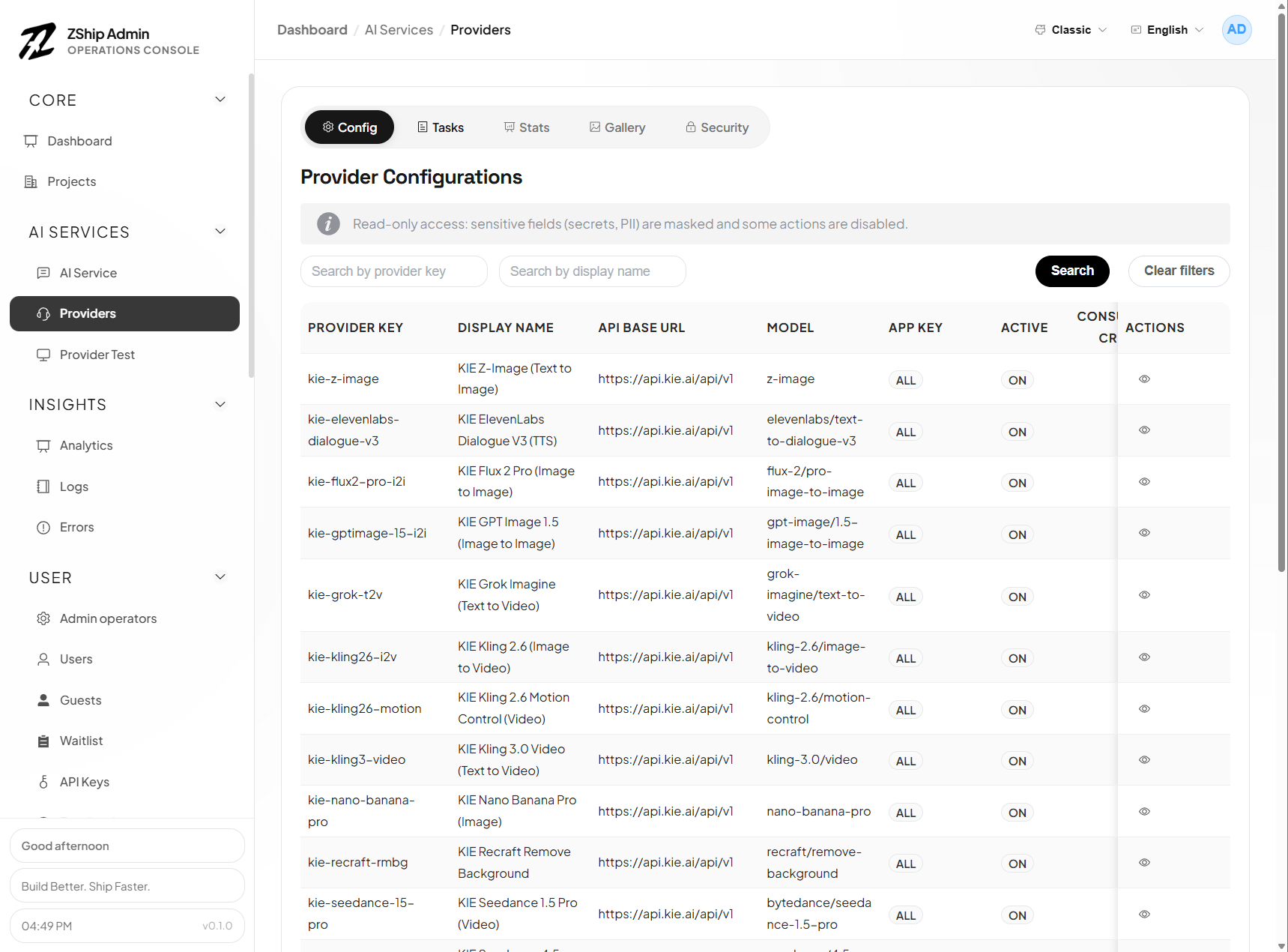
Testing (dedicated Provider test page)
Section titled “Testing (dedicated Provider test page)”| Tool | Why we built it |
|---|---|
| Dry run | Validate payload, mapping, validation, and credit estimate with no upstream call and no charge — catch misconfiguration before it burns credits in production. |
| Live test | Prove API keys, callback base URL, and connectivity with real HTTP; does not debit end-user credits — safe for destructive debugging. |
| Status lookup | Async jobs often stall in IN_PROGRESS; fetch by task id to see whether the bottleneck is upstream slowness, lost webhooks, or mapping bugs. |
| Webhook debugging | Wrong callback URLs look like “tasks never finish”; dedicated checks cut callback integration time sharply. |
Takeaway: Separate “is the config correct?” from “are we charging real users while experimenting?”
Task & log management (Providers → Tasks)
Section titled “Task & log management (Providers → Tasks)”| Tool | Why we built it |
|---|---|
| Searchable list | Support can find a run by email, task id, model, … without grepping raw application logs. |
| Per-task detail (stored requests/responses) | Keeps user payload, upstream request/response, errors, and credits for disputes, audits, and engineering repro (sensitive fields may be redacted by role). |
| Retry | Transient upstream/network failures are cheaper to replay the same request than asking users to click again; also verifies “after fixing config, does the same job succeed?”. |
Takeaway: Observability for async pipelines — without it you only see “failed”, not where it failed.
Statistics (inside Tasks)
Section titled “Statistics (inside Tasks)”| View | Why we built it |
|---|---|
| Overview | Totals, success/fail/in-flight, credits, distinct users — capacity and cost at a glance. |
| By provider | See which vendor is expensive, slow, or flaky — data for model choices and targeted throttling. |
| Filter by app_key | Split usage by project or tenant for billing, limits, and account reviews. |
Takeaway: Move from “it runs” to “we know how it runs and where money goes”.
Public gallery (Providers → Gallery + public GET /gallery)
Section titled “Public gallery (Providers → Gallery + public GET /gallery)”| Tool | Why we built it |
|---|---|
| User opt-in public | Separates shareable outputs from private generations — fewer privacy incidents. |
| Public list API | Marketing / campaign pages can show curated results in a grid without exposing R2 as a flat public file dump. |
| Moderation & featured | Community surfaces need policy review and editorial slots for campaigns and social proof. |
Takeaway: Turn raw task output into marketable, community-facing assets.
Security & abuse prevention
Section titled “Security & abuse prevention”| Control | Why we built it |
|---|---|
| Rate limits (scoped) | Protect upstream quotas and your credit economy from scripted abuse; per-key / per-provider / global scopes with 429 and retry hints. |
| API key blocks | When keys are stolen or misused, revoke at the gateway (per provider or wildcard) faster than code deploys. |
| IP & edge (Cloudflare) | The service enforces who uses which key; IP/geo/bot rules belong on Cloudflare WAF / custom rules and stack with the controls above. |
Takeaway: Keep an open API usable while bounding cost and abuse risk.
Content moderation setup
Section titled “Content moderation setup”Content moderation runs before a generation request is sent to KIE, WaveSpeed, or another generation provider. It checks only the configured request fields and normalizes the upstream response to allow, deny, flag, error, or skipped.
Before you enable it
Section titled “Before you enable it”- Deploy versions of
zship-provider1-serviceand Admin that include content moderation. - Run
pnpm db:migrate:remotefrombackend/zship-provider1-service. Confirm that0015_content_moderation.sqland0016_content_moderation_field_rules.sqlhave been applied. - Create a dedicated API key in the moderation vendor’s console. Do not reuse a generation-provider key unless the vendor explicitly issues the same credential, and never put the key in frontend code or documentation.
Recommended configuration sequence
Section titled “Recommended configuration sequence”- Open Admin → Providers → Content moderation.
- Select the project scope.
All projects (default)is the wildcard fallback; an enabled configuration for a specificapp_keytakes precedence. - Select the moderation provider, verify the prefilled HTTPS endpoint, and enter the API key and timeout. Keep moderation disabled while testing.
- Configure the default prompt fields and any provider/model-specific overrides.
- Choose whether to charge the user, then configure failure and
flagbehavior. - Save the configuration. In the Provider test panel, test both clearly safe and clearly disallowed prompts. Tests call the real moderation API but do not debit end-user credits.
- Enable moderation only after the tests pass, then monitor decisions, latency, status codes, and credits under Recent decisions.
Supported moderation providers
Section titled “Supported moderation providers”| Provider | Default API endpoint | Authentication and behavior |
|---|---|---|
| Creem Screen Prompt | https://api.creem.io/v1/moderation/prompt | Uses a Creem API key and returns a synchronous result. |
| WaveSpeed Content Moderator | https://api.wavespeed.ai/api/v3/wavespeed-ai/content-moderator/text | Uses a WaveSpeed API key; the gateway handles submission, polling, and output retrieval. |
Keep the default endpoint unless the vendor explicitly requires another production endpoint. Endpoints must use HTTPS, and the timeout must be between 1,000 and 30,000 ms.
Choose which fields to review
Section titled “Choose which fields to review”Default prompt fields are comma-separated field paths, for example:
prompt, text, negative_prompt, input.promptDots address nested object properties. String values are included directly; arrays of strings are included item by item, with duplicate text removed. If none of the configured fields are present, the result is skipped: no moderation request is sent and no moderation credits are charged.
When generation providers or models use different request shapes, add a provider/model field override. Field selection uses this precedence:
- Exact generation provider + model rule
- Generation-provider default rule (model left empty)
- Default prompt fields
For example, if one KIE model reads input.prompt while a WaveSpeed model reads prompt, configure separate rules instead of sending both fields unconditionally.
Decisions, failures, and billing
Section titled “Decisions, failures, and billing”| Setting / result | Runtime behavior |
|---|---|
allow | Passes moderation and continues to the generation request. |
deny | Always blocks generation with CONTENT_MODERATION_BLOCKED. |
flag | Blocks when Block flagged prompts is enabled; otherwise generation continues. |
error | Continues when Fail open is enabled; otherwise returns CONTENT_MODERATION_UNAVAILABLE. |
skipped | No configured field was found, so moderation is not called and generation continues. |
| Charge user | When a moderation API call was attempted, charges the configured credits per check. Admin tests never debit user credits. |
Moderation and generation are billed separately. Once a moderation call has occurred, its credits are retained even if the prompt is blocked or the later generation fails. Only generation credits follow the normal generation-refund path. This separation applies to prepaid and enterprise billing. Before enabling user charges, verify the vendor’s per-call price, your credit conversion, and the desired insufficient-balance experience.
Audit and privacy boundary
Section titled “Audit and privacy boundary”Recent decisions store operational metadata such as request ID, project, user, generation provider, moderation provider, decision, reason, prompt length, status code, duration, and credits. The prompt text itself is not stored. The selected text is still sent to the configured third-party moderation provider, so review the vendor’s privacy, data residency, and retention terms before production use.
Troubleshooting
Section titled “Troubleshooting”- Save before testing: the test panel uses the API key, endpoint, and timeout stored in the database.
- API key required when enabling: enter a valid key and save. Existing keys may appear masked in read-only or redacted views.
- A model checks the wrong fields: confirm that the generation provider key and model ID exactly match Providers configuration, and look for a higher-priority exact rule.
- Many results are
skipped: the configured paths do not match the actual generation request body. - The moderation vendor is intermittently unavailable: inspect response codes and latency, adjust the timeout, and decide whether fail-open matches your risk policy.
- The user was charged but generation failed: this is expected for a completed moderation attempt; generation credits follow their own refund path while moderation credits are retained.
Purchase & setup
Section titled “Purchase & setup”Contact us to purchase the AI Provider Service. After purchase:
- Deploy
backend/zship-provider1-serviceto Cloudflare - Point admin’s
PROVIDER1_SERVICEbinding at your Worker - Configure providers (KIE, WaveSpeed, …) under Admin → Providers
Admin entry points
Section titled “Admin entry points”- Providers (
/providers) — config, content moderation, tasks, stats, gallery, rate limits, blocks - Provider test (
/providers-test) — dry run, live test, status, webhook checks